
Daily TSP
Taza Technology, LLCFinance
3.9542.00 Reviews
- Version
- 7.0.0
- Installs
- 100.00K
- Age Rating
- Everyone
Screenshots
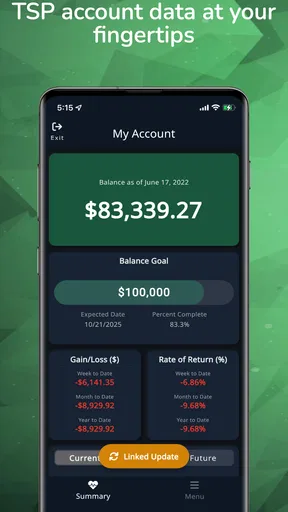
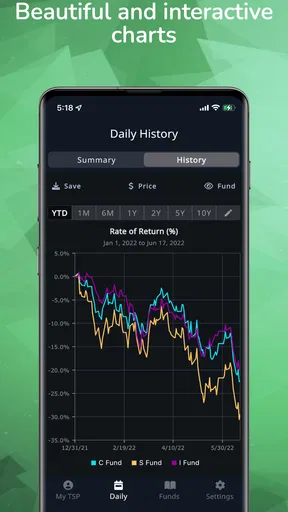
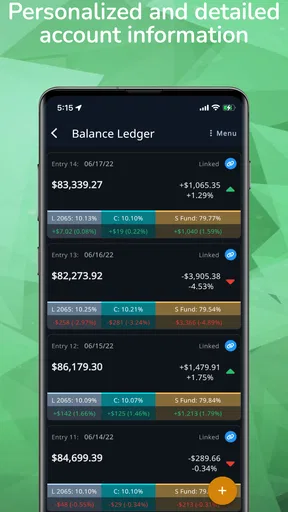
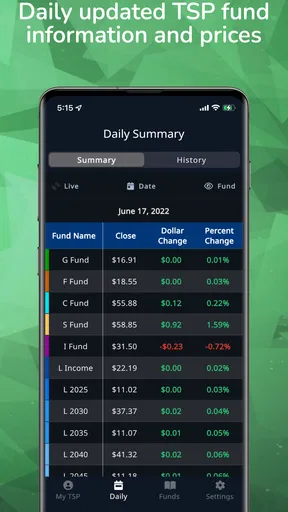
Our Review of Daily TSP
 Analysis by Appyee
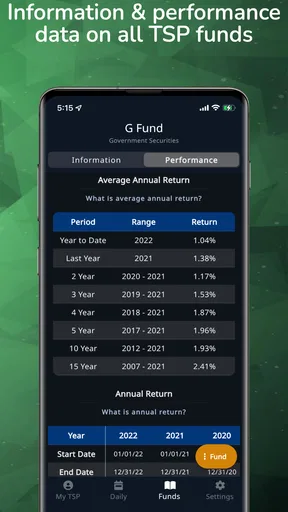
I’d look at Daily TSP as a focused account-checking tool, not as a general-purpose investing or budgeting app. Its purpose is to track Thrift Savings Plan fund share prices and your account balance, with charts to help you see how those figures move. That narrow focus is useful when the TSP is the account you want to keep an eye on; it also sets a clear limit on what I’d expect it to do.
What the free price means in practice
The app is free to download, which makes it easy to try without paying upfront. There are also in-app purchases priced from $9.99 to $49.99 per item. I would treat those as an optional cost rather than assume a paid item is necessary for basic access: the key decision is whether the free experience already gives you the account and fund-price visibility you need. Before buying anything, I’d check the purchase screen carefully and compare the specific paid offering with the feature you actually want.
That distinction matters in a finance app. A free download does not automatically mean every capability is free, and an optional purchase is not automatically good value for every user. If your main goal is simply to check a balance or follow fund prices now and then, I’d start with the no-cost version and see whether it fits your routine. If a paid option is presented, judge it by the benefit it adds to your own TSP workflow, not by the fact that it appears inside an investing-related app.
A focused value proposition, not a full financial picture
Daily TSP is published by Taza Technology, LLC and sits in the finance category. It has an average rating of 3.9 from around 1.4 thousand ratings, with over 100 thousand installs. Those figures suggest that people do use it as a dedicated TSP companion, but they don’t tell me whether it will suit someone who wants a complete view of household finances. The value is in keeping attention on one retirement account, rather than replacing a bank app, a broad portfolio tracker, or a full planning service.
The distinction is practical: if you already visit your TSP account through its usual account channels, this app’s appeal is having a more convenient way to follow balance and share-price changes, with charts to add visual context. A chart can help me notice direction and timing at a glance, but it should not be mistaken for an explanation of why a fund moved or a recommendation about what to do next. I’d use the display as a prompt to review, not as an instruction to trade or change an allocation.
How I’d work it into an ordinary week
Imagine checking your finances on a weekend. You open the app to see whether your TSP balance has changed, glance at the fund-price charts, and note whether anything deserves a closer look when you next review your retirement plan. That is a reasonable, low-effort use: it keeps the account visible without turning every daily price movement into a decision. For a person who prefers a quick check on a phone over signing in to a larger account portal each time, that convenience may be the main value.
I’d keep a deliberate boundary around that habit. A daily balance check can be reassuring, but repeated checking may make ordinary market movement feel more urgent than it is. A useful approach is to decide in advance when you want to look—for example, during a regular personal finance review—and use the chart to observe rather than react. The app is most helpful when it supports a plan you already have, not when it becomes a substitute for one.
Where it sits among finance apps
Compared with a general budgeting app, Daily TSP is much narrower: a budget tool is built around spending, bills, and cash flow, while this app’s stated focus is TSP fund prices and account balance tracking. Compared with a broad investment tracker, its appeal is the same specialization; its trade-off is that someone managing several kinds of accounts may prefer one place to see a wider portfolio. And compared with checking the account through its normal online channel, the app may be more convenient for quick mobile monitoring, while the official account experience is the more natural place to handle account-level tasks.
That comparison helps clarify who should skip it. If you don’t have a TSP account, need a detailed household budget, or want one dashboard for many types of investments, this is unlikely to be the right primary finance app. If you want personalized retirement advice or a tool that tells you what allocation to choose, price charts alone are not a substitute. I’d choose a broader service for those jobs and keep this one only if TSP monitoring is a specific need.
The Setup
Getting started with Daily TSP is a breeze. Once you download it, the app greets you with a clean and user-friendly interface. No clutter here, folks. It’s intuitive enough that you won’t need a manual to figure out where everything is. The onboarding process is smooth, guiding you through all the major features without overwhelming you with too much information at once.
Features That Stand Out
Here’s where the app really shines. Task Management is at the core, allowing you to create tasks with deadlines, priorities, and even sub-tasks. You can break down those big, scary projects into manageable chunks, which is a game changer for procrastinators like me.
Another nifty feature is the Daily Planner. It’s like having a digital diary that keeps you on track. You can slot in your tasks for the day and get a clear visual of what needs to be done. The app also sends you timely reminders, so you don’t end up missing important deadlines.
Integration and Sync
If you’re like me and use a million different devices, you’ll appreciate how seamlessly Daily TSP syncs across platforms. Whether you’re on Android or iOS, or even switching between your phone and tablet, the app keeps everything up to date. The integration with calendars and other productivity tools is also a big plus. It’s like the app knows you better than you know yourself!
Customization Options
One of my favorite things about Daily TSP is how customizable it is. You can tweak the theme, set personal goals, and even customize your notifications. It makes the app feel personal and tailored just for you, which is a nice touch.
The User Experience
In terms of performance, the app is pretty solid. I didn’t encounter any bugs or crashes during my time with it, which is always a relief. The developers have clearly put a lot of thought into making sure everything runs smoothly.
The app’s design is minimalistic but effective. It’s easy on the eyes and doesn’t overwhelm you with too many colors or graphics. This makes it perfect for long usage sessions, especially when you’re deep in planning mode.
Community and Support
Let’s talk about the support and community aspect. The app has a pretty active user community where you can share tips and tricks or just vent about your productivity struggles. The support team is responsive, which is always a bonus when you need a helping hand.
Final Thoughts
All in all, Daily TSP is a solid choice for anyone looking to boost their productivity. It’s got all the features you’d expect from a top-tier productivity app, plus a few extras that make it stand out. Whether you’re juggling work, school, or just trying to keep your life organized, this app is definitely worth a try. So, if you’re ready to step up your productivity game, give Daily TSP a download. You won’t regret it!
Compatibility and expectations
The current version is 6.6.0, and the listed minimum operating-system requirement is version 7.0. It is marked for Everyone and was released on October 16, 2019. Those details are useful when deciding whether an older device can run it, but I’d still check the app’s current compatibility on the device you plan to use before building a routine around it. The app is specifically about TSP monitoring; I wouldn’t assume that its charts cover other retirement plans or investment accounts.
A practical tip is to decide what you want to learn from each visit before opening it. If you’re checking the balance, look at the balance; if you’re reviewing fund movement, use the chart as context and then step back. That small habit can keep a tracking tool from encouraging impulsive decisions based on short-term changes. For bigger retirement choices, I’d compare the account information with your own long-term plan and use a qualified source of guidance when needed.
Who is likely to get enough value
I’d recommend giving it a try if you have a TSP account and want a convenient way to keep its balance and fund prices in view. Its free starting point lowers the barrier, while the focused scope can be a benefit for someone who doesn’t want a crowded all-in-one finance dashboard. It may also suit people who already have a separate budgeting method and only need a dedicated place to monitor this account.
I’d be more cautious if you are looking for detailed analysis, comprehensive financial planning, or a consolidated view of multiple accounts. The charts can make changes easier to see, but visibility is not the same as interpretation. If you’re not sure what a movement means, or whether it should affect your decisions, the app’s role is to show information—not settle the question for you.
My buy-or-skip verdict
For me, Daily TSP makes the most sense as a free, specialized companion for people who already know they want to monitor their TSP account on a phone. Start without paying, see whether the balance and price views fit your routine, and consider an in-app purchase only if its stated benefit solves a real problem for you. The paid items range from $9.99 to $49.99 each, so I would not spend simply because an upgrade is available.
Overall, I’d try it if quick TSP tracking is the job you need done; I’d skip it if you expect budgeting, broad portfolio management, or retirement advice. That is a fairly clear bargain: the app’s value comes from being focused, and that same focus is its main limitation. If your needs match that focus, it can be a handy way to keep the account on your radar without treating every chart movement as a call to action.
Verdict
Strengths of Daily TSP
- User-friendly interface that's easy to navigate.
- Offers detailed statistics and tracking features.
- Customizable alerts for important tasks.
- Integrates smoothly with other productivity apps.
- Regular updates with new features and bug fixes.
Limitations of Daily TSP
- Limited free version with essential features locked.
- Occasional sync issues between devices.
- Heavy on battery usage during background tasks.
- Some features require a constant internet connection.
- Ads can be intrusive in the free version.
Similar Picks in This Category
View All
Google Wallet
Google LLC4.3

Airtel: Recharge, Bank & Loans
Airtel4.0

PayPal - Pay, Send, Save
PayPal Mobile4.2

DANA Indonesia Digital Wallet
PT Espay Debit Indonesia Koe4.5

Binance: Buy Bitcoin & Crypto
Binance Inc.4.8

Cash App
Block, Inc.4.7
Frequently Asked Questions
What is Daily TSP and how does it work?
Daily TSP is a productivity app designed to help users optimize their daily tasks through efficient planning and scheduling. It uses a unique algorithm to prioritize tasks based on urgency and importance, ensuring that users make the most of their day. The app offers customizable settings to tailor the experience to individual needs.
Is Daily TSP available for both Android and iOS devices?
Yes, Daily TSP is available for download on both Android and iOS platforms. Users can find it on the Google Play Store for Android devices and the Apple App Store for iOS devices. The app is designed to offer a seamless experience across different operating systems.
Does Daily TSP require an internet connection to function?
Daily TSP primarily functions offline, allowing users to access their schedules and tasks without an internet connection. However, certain features like cloud synchronization and data backup require an internet connection to ensure seamless integration across multiple devices.
Are there any subscription fees or in-app purchases in Daily TSP?
Daily TSP offers a free version with basic features suitable for everyday use. For users who require advanced features such as enhanced analytics and priority support, there is a premium subscription option available. The app also includes optional in-app purchases for additional customization.
How does Daily TSP ensure the security of my personal data?
Daily TSP prioritizes user privacy and employs robust security measures to protect personal data. The app uses encryption to secure data both at rest and in transit. Additionally, users can enable password protection and two-factor authentication for added security measures.
